Print inventory barcode labels from Excel
New here? Start with create and print labels online free, the hub for design, barcodes, shipping, and thermal print setup. Also: free label maker software · full site map.
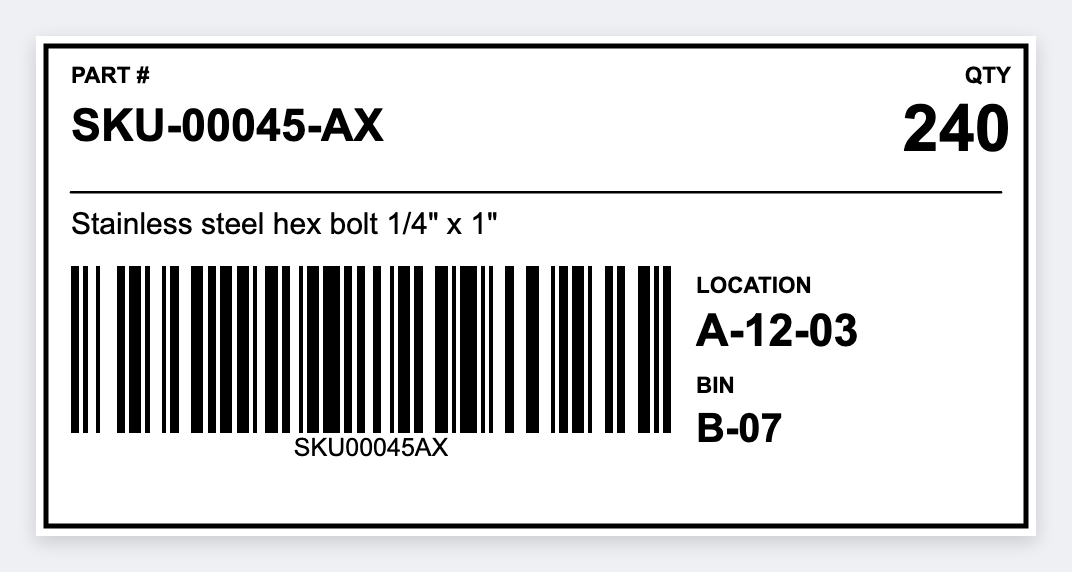
You can print inventory barcode labels from Excel without BarTender. Design once, load CSV, print one CODE128 or UPC label per row on a Zebra with Browser Print. SKU stickers, bin tags, receiving labels. Free. No signup.
What you can print
- SKU / product stickers. CODE128 or UPC-A plus the product name.
- Bin / shelf locations. Aisle-rack-level codes for pick paths.
- Stock quantity tags. SKU plus QTY for cycle counts.
- Receiving labels. PO number plus a SKU barcode.
Prepare Excel
- One row per label. Headers in row 1, for example
sku,name,bin,qty,upc. - File, Save As, CSV UTF-8 (important for special characters).
- Avoid merged cells and blank header columns.
Design the inventory barcode label
- Open https://app.mylabelmaker.com. No signup.
- Pick size: 2×1 for product stickers, 3×2 for bin tags (see sizes guide).
- Add a barcode. Value
{{sku}}or{{upc}}. Format CODE128 or UPC-A. - Add text:
{{name}}, optionalBIN {{bin}},QTY {{qty}}. - Variables panel: paste or upload CSV, preview a row, then print.
Scan test: Print one sample and scan it with your handheld or phone before running 500 labels. Quiet zones (blank margins) around the barcode matter more than font choice.
Printers that work
ZD420, ZD421, GK420d, and industrial ZT models all work. Setup: ZD420, Browser Print.